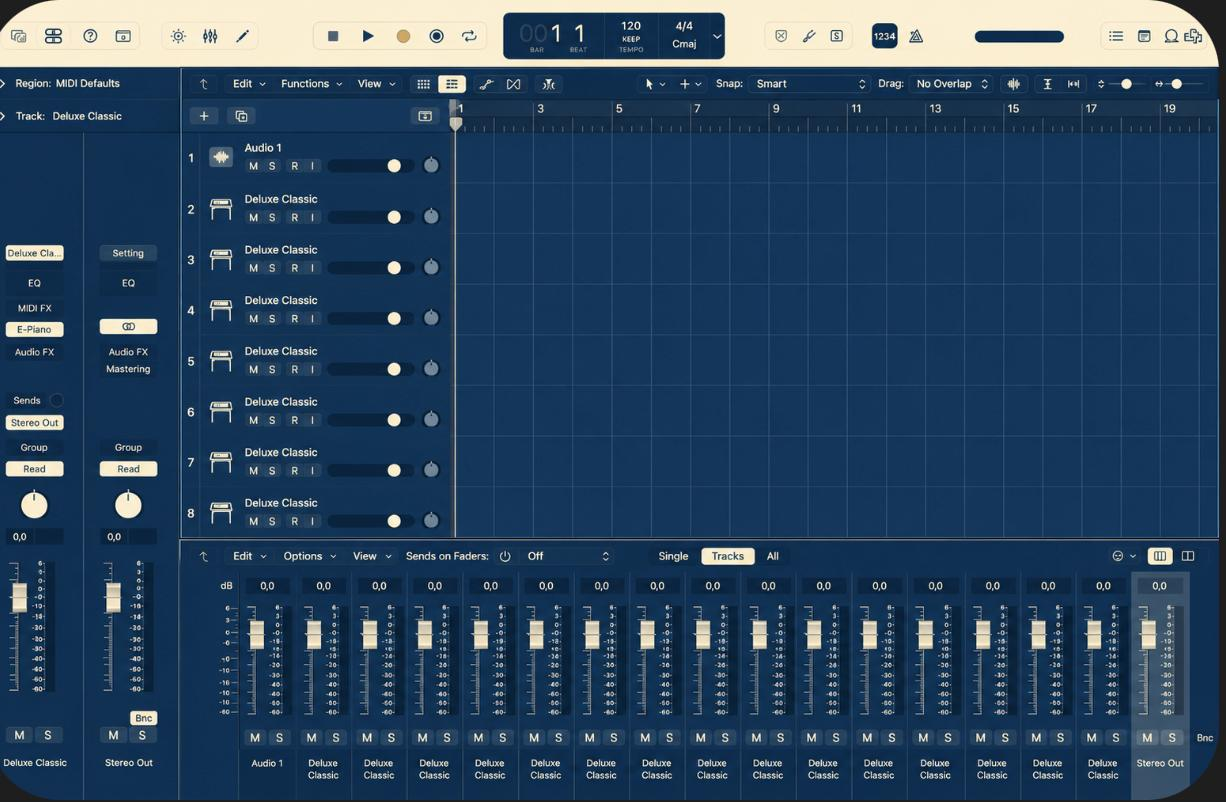
Navy Cream
€12#1b2c4b · #e5dfca
Deep navy surfaces, warm cream accent. Calm, expensive, easy on tired eyes at 2am.
Buy Navy CreamLogic has looked the same grey since 2013. These go all the way down — every mixer strip, meter, fader and grid line. Not a wallpaper.
Most "themes" recolour a window border and call it a day. This one goes after every grey surface Logic has — including the ones Apple draws at runtime.
Every channel-strip body, name plate and pan gutter — Stereo Out and Master included.
Stock green remapped to your accent across mixer, track headers and master. Clip colours stay.
Fader caps and pan knobs re-molded in the accent tone, shading and highlights preserved.
Bar and beat lines re-inked so the grid sits on the new surface instead of fighting it.
Loop browser, project bin, event lists, note pads, inspector, every toolbar strip.
Transport chrome, toggles and the LCD — recoloured to match, not left in stock grey.
Each ships as a complete installer for Logic Pro 12 on macOS — one command in, one command out.
#1b2c4b · #e5dfca
Deep navy surfaces, warm cream accent. Calm, expensive, easy on tired eyes at 2am.
Buy Navy Cream#212124 · #8fbcf8
Logic, but properly dark. Near-black surfaces with a cool fader-blue accent.
Buy Charcoal#670626 · #bad797
Dark cherry surfaces cut with a matcha-green accent. The loud one.
Buy Cherry MatchaAll three, plus every theme released later. Swap whenever the mix calls for it.
A small package: an installer, an uninstaller, and your palette baked in.
It backs up every file it touches before applying the theme to Logic's resources.
Everything is recoloured. Changed your mind? Stock Logic comes back byte-for-byte.
Nothing is destroyed. Full backups before install · one-command uninstall · after a Logic update, just run the installer again. Projects, plugins and preferences are never touched — this is purely cosmetic.
uninstall.sh puts stock Logic back exactly as it was. Projects, plugins and
settings are never modified.